How to Add a DPDP Consent Banner to React and Next.js
Add a DPDP-compliant consent banner to a React or Next.js app: load it first, block analytics until consent, set Consent Mode defaults and test it.
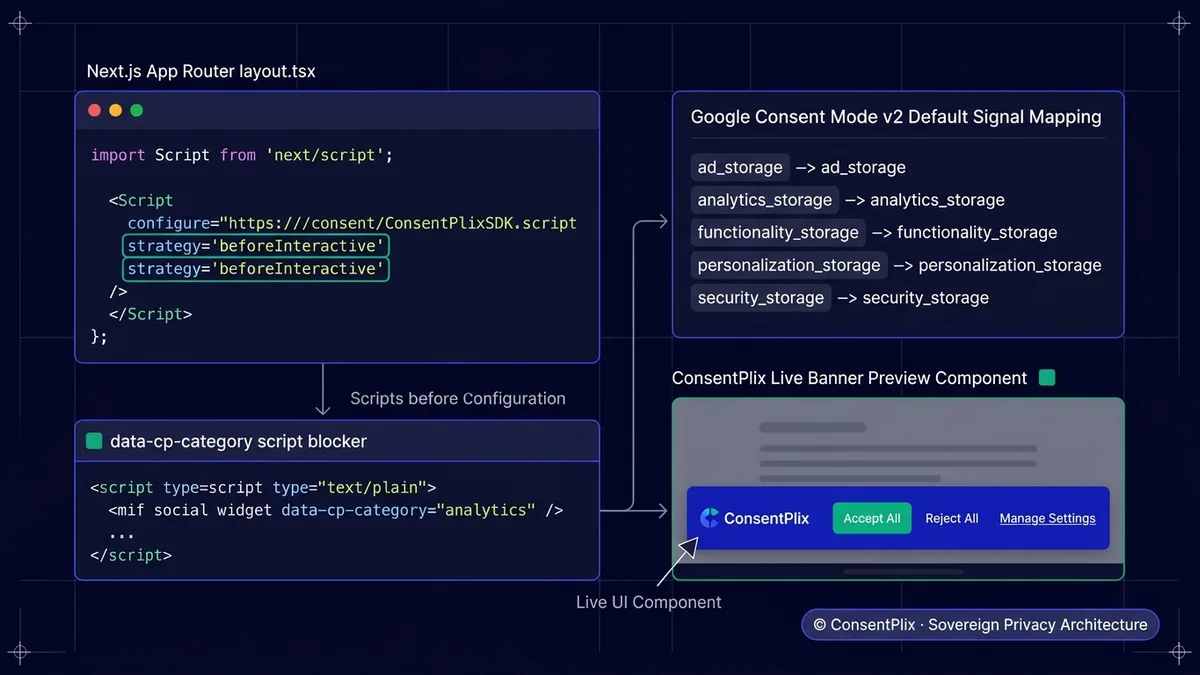
To make a React or Next.js app DPDP compliant, load the consent script before any analytics or ad scripts, mark non-essential scripts so they run only after the user consents, set Google Consent Mode v2 defaults to denied, and keep proof of each consent. In Next.js App Router, add the ConsentPlix script in app/layout.tsx with next/script and strategy beforeInteractive. In a Vite React app, add it to index.html. Analytics and marketing scripts use type text/plain with a data-cp-category attribute so they only run after consent, which meets Section 6(1) of the DPDP Act 2023.
The short answer
In a React or Next.js app, a DPDP consent banner has to do three things: load before anything else, keep analytics and ad scripts from running until the user agrees, and store proof of each choice. Here is how to do it with ConsentPlix in a few minutes.
Why order matters
Section 6(1) of the DPDP Act requires a clear affirmative action before you process personal data for a purpose. If Google Analytics or Meta Pixel loads before the banner, you have already collected data without consent. The full reasoning is in consent before ads and tracking scripts.
Next.js (App Router)
Add the script in app/layout.tsx with next/script and beforeInteractive, so it runs before your own code:
import Script from "next/script";

export default function RootLayout({ children }: { children: React.ReactNode }) {
  return (
    <html lang="en">
      <body>
        <Script
          src="https://cdn.consentplix.com/cp.min.js"
          data-site-token={process.env.NEXT_PUBLIC_CONSENTPLIX_TOKEN}
          data-api-base="https://api.consentplix.com"
          strategy="beforeInteractive"
        />
        {children}
      </body>
    </html>
  );
}
React with Vite
Add the script to index.html. Vite replaces the token from your .env file at build time:
<head>
  <script
    src="https://cdn.consentplix.com/cp.min.js"
    data-site-token="%VITE_CONSENTPLIX_TOKEN%"
    data-api-base="https://api.consentplix.com"
  ></script>
</head>
Block analytics until consent
Change each non-essential script to type="text/plain" and tag it with its purpose. The browser will not run it until the user allows that category:
<!-- Google Analytics: runs only after 'analytics' consent -->
<script
  type="text/plain"
  data-cp-category="analytics"
  src="https://www.googletagmanager.com/gtag/js?id=G-XXXXXX"
></script>
In Next.js, render these tags from your layout rather than loading analytics with an npm package that starts on import. If a library starts tracking as soon as it is imported, move it behind consent.
Google Consent Mode v2
If you use Google tags, set the Consent Mode defaults to denied before any Google tag loads. ConsentPlix updates them when the user chooses. See Google Consent Mode v2 for DPDP.
Single-page apps and route changes
React apps change routes without a full page load. Two things to check:
- the banner state should survive route changes, so users are not asked again,
- page-view tracking that fires on route change must also wait for consent.
Test it
- Open the site in a private window.
- In DevTools, Network tab, confirm no analytics or ad requests go out before you choose.
- Click Reject and browse a few pages: still no tracking requests.
- Accept analytics and confirm the analytics request now appears.
- Withdraw from the preferences link and reload: tracking stops again, as Section 6(4) requires.
You can also run the free DPDP website scanner on your deployed site.
Next steps
- Full setup options are in the quickstart and cookie compliance docs.
- Write your notice with the privacy notice generator.
- Serving users outside India too? Read one banner for DPDP, GDPR and CCPA.
The ConsentPlix script is under 12KB with zero dependencies, so it will not hurt your Core Web Vitals. Start free.
Amjad Rathod
Co-Founder & Chief ArchitectLead architect of the ConsentPlix consent ledger and sub-12KB client SDK. Works on DPDP Section 6 consent flows and high-throughput privacy engineering.
Continue exploring sovereign compliance engineering.
Ready to deploy provable consent infrastructure?
Deploy in minutes with our sub-12KB SDK or schedule a customized technical consultation with our privacy engineering team.