Building DPDP Compliant Consent Flows in React Native and Flutter Mobile Apps
How to engineer DPDP Act compliant consent flows in React Native and Flutter mobile apps. Native OS permissions, offline caching, and sub-12KB SDK integration.
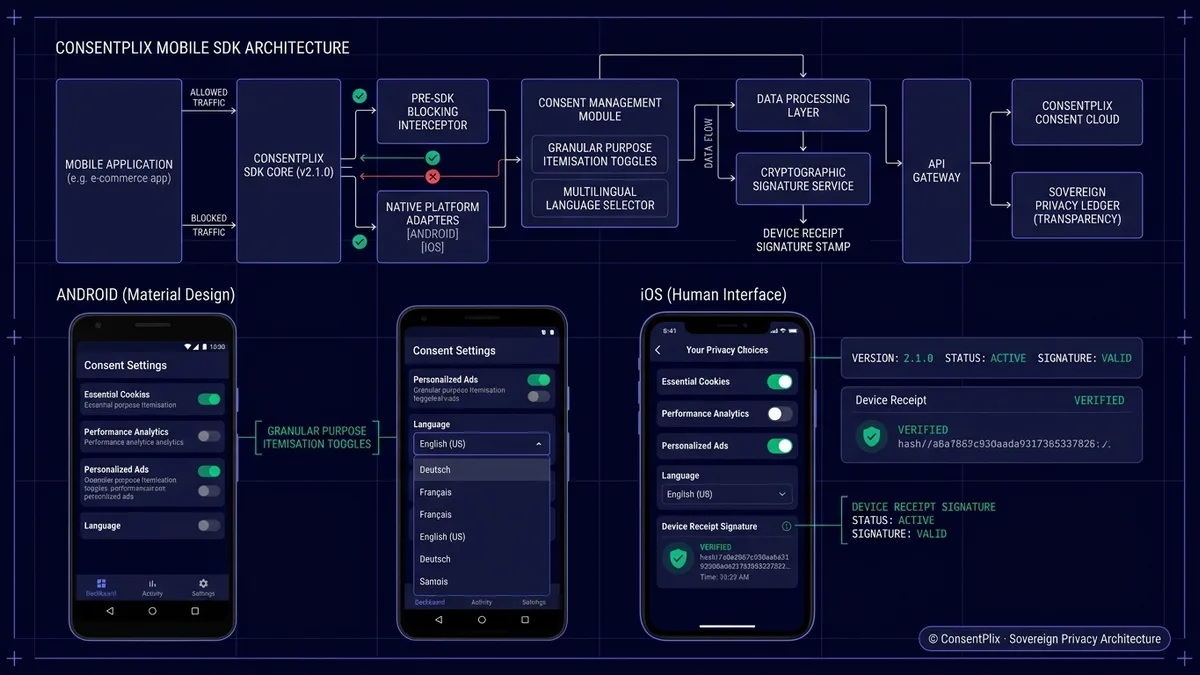
Practical mobile engineering tutorial for implementing India DPDP Act 2023 compliant consent flows in React Native and Flutter applications. Details why web-based cookie banners fail in mobile environments, how to synchronize native OS runtime permissions with statutory DPDP consent categories under Section 6(1), handling intermittent connectivity via cryptographic offline caching, and preventing ad networks (AdMob, Unity, Meta) from capturing device identifiers prior to affirmative consent.
Why Web Cookie Banners Fail in Mobile App Environments
With India’s digital ecosystem overwhelmingly driven by mobile smartphones, millions of users interact with services exclusively through native Android and iOS applications.
Yet, many mobile development teams make a critical architectural error when preparing for the Digital Personal Data Protection (DPDP) Act, 2023: they attempt to load web-based cookie banners inside in-app WebViews.
This approach fails on multiple technical and legal fronts:
- No Cookies in Native Context: Mobile apps do not use browser DOM cookies. Tracking in mobile environments relies on device identifiers (GAID, IDFA), push notification tokens, and native SDK telemetry (Firebase, AppsFlyer, Mixpanel, AdMob).
- Poor User Experience & Lag: Rendering WebViews causes noticeable UI stutter, increases cold start times, and disrupts native gesture navigation.
- OS Permission Desynchronization: A web modal cannot inspect or control native Android and iOS runtime permissions (camera, location, contacts, notifications). If your app requests camera access before recording DPDP consent, statutory compliance is violated.
Under Section 6(1) of the DPDP Act, consent in mobile apps must be clear, affirmative, unbundled, and given prior to data collection. Here is how to architect a native, high-performance consent flow in React Native and Flutter.
Architecture: Native Mobile Consent Lifecycle
To deliver a compliant and fluid experience, mobile privacy architecture must follow an offline-first, event-driven pattern:
+------------------------------------------------------------------------+
|                          APP LAUNCH LIFECYCLE                          |
|         [Cold Start] ---> [ConsentPlix Mobile SDK Initializes]         |
|                                |                                       |
|                                v                                       |
|             [Check Local Encrypted Keystore / Keychain]                |
|                                |                                       |
|        +-----------------------+-----------------------+               |
|        | Valid Receipt Found                           | No Receipt    |
|        v                                               v               |
|  [Verify Hash with AWS Mumbai]               [Render Native Modal]     |
|  - Initialize Approved SDKs                  - 22 Indian Languages     |
|  - Proceed to Home Screen                    - Granular Toggles        |
+--------------------------------------------------------|---------------+
                                                         |
                                 User Grants Consent     |
                                                         v
                                               [Generate Local Receipt]
                                               [Queue Background Sync]
                                               [Unblock Native SDKs]
1. Native Permission Synchronization in React Native
In a compliant mobile architecture, requesting a device permission (e.g., location or notifications) must be tied directly to a specific purpose notice under Section 5.
Using the ConsentPlix React Native wrapper, developers wrap sensitive SDK initializations within explicit consent checks:
import React, { useEffect } from 'react';
import { ConsentPlix, PurposeCategory } from '@consentplix/react-native';
import analytics from '@react-native-firebase/analytics';

export function useAppInitialization() {
  useEffect(() => {
    async function initSdk() {
      // Initialize ConsentPlix with AWS Mumbai domestic endpoint
      await ConsentPlix.initialize({
        appId: 'cp_app_7a91b2c4',
        environment: 'production',
        defaultLocale: 'hi', // Eighth Schedule language support
      });

      // Check affirmative consent before initializing tracking
      const hasAnalyticsConsent = await ConsentPlix.hasConsent(
        PurposeCategory.ANALYTICS_TELEMETRY
      );

      if (hasAnalyticsConsent) {
        await analytics().setAnalyticsCollectionEnabled(true);
      } else {
        await analytics().setAnalyticsCollectionEnabled(false);
      }
    }

    initSdk();
  }, []);
}
By ensuring that setAnalyticsCollectionEnabled(false) executes by default on cold start, zero user telemetry escapes before affirmative consent is established.
2. Handling Offline-First Mobile Realities in Flutter
Mobile users in India frequently experience intermittent network connectivity when traveling between rural and urban corridors. A mobile app must not block user navigation if an internet connection is unavailable to sync consent back to the cloud.
The ConsentPlix Flutter plugin implements cryptographic offline queueing:
import 'package:flutter/material.dart';
import 'package:consentplix_flutter/consentplix_flutter.dart';

void onUserConsentUpdated(ConsentReceipt receipt) async {
  // 1. Immediately write signed receipt to local secure storage
  await ConsentPlix.storeLocalReceipt(receipt);

  // 2. Queue asynchronous background sync
  ConsentPlix.syncQueue.add(receipt);

  // 3. Register WorkManager job for guaranteed background delivery
  Workmanager().registerOneOffTask(
    "sync-consent-task",
    "syncConsentWithCloud",
    constraints: Constraints(
      networkType: NetworkType.connected,
    ),
  );
}
When network access is restored, the background worker automatically transmits the queued receipt to the ConsentPlix ledger in AWS Mumbai (ap-south-1). The cryptographic HMAC-SHA256 signature guarantees that the receipt’s local creation timestamp cannot be altered or disputed during audits.
3. Section 6(4) In-App Preference Centers
Section 6(4) of the DPDP Act mandates that withdrawing consent must be as easy as granting it. In mobile apps, users must be able to change their preferences at any time without leaving the app.
Our mobile SDKs provide a native, customizable Privacy Preference Sheet:
- Accessible directly from the mobile app’s “Settings” or “Account” screen.
- Allows granular toggling of individual purposes (e.g., opting out of marketing push notifications while retaining operational alerts).
- Renders in the user’s preferred Eighth Schedule Indian language.
- Instantly updates local SDK state, stopping tracking immediately upon toggle.
4. Avoiding AdMob & Meta Tracking Leaks on Launch
A common reason mobile apps fail privacy audits is third-party ad networks (Google AdMob, Meta Audience Network, Unity Ads) initializing in the native Application class (Android) or AppDelegate (iOS) before any JavaScript or Dart code executes.
To ensure compliance:
- Delay Native SDK Initialization: Do not initialize ad network SDKs in your native
onCreateordidFinishLaunchingWithOptions. - Pass Consent Flags to Ad Providers: When user consent is determined, pass explicit parameters (such as Google Mobile Ads
npa=1for non-personalized ads) directly to the native ad request builders.
Summary: Future-Proofing Your Mobile Architecture
Mobile app compliance under the DPDP Act requires deep native engineering:
- Replace clumsy WebViews with native React Native and Flutter UI components.
- Enforce default-denied SDK initialization states on cold launch.
- Deploy offline-first cryptographic receipt caching.
- Provide accessible in-app preference centers for single-click withdrawal under Section 6(4).
To learn how ConsentPlix engineers bespoke mobile SDK wrappers for enterprise apps, check our Custom Consent Management Setup or contact our privacy engineering team today.
Amjad Rathod
Co-Founder & Chief ArchitectLead architect of the ConsentPlix consent ledger and sub-12KB client SDK. Works on DPDP Section 6 consent flows and high-throughput privacy engineering.
Continue exploring sovereign compliance engineering.
Ready to deploy provable consent infrastructure?
Deploy in minutes with our sub-12KB SDK or schedule a customized technical consultation with our privacy engineering team.